How to Get Police Clearance without Visiting Police Station
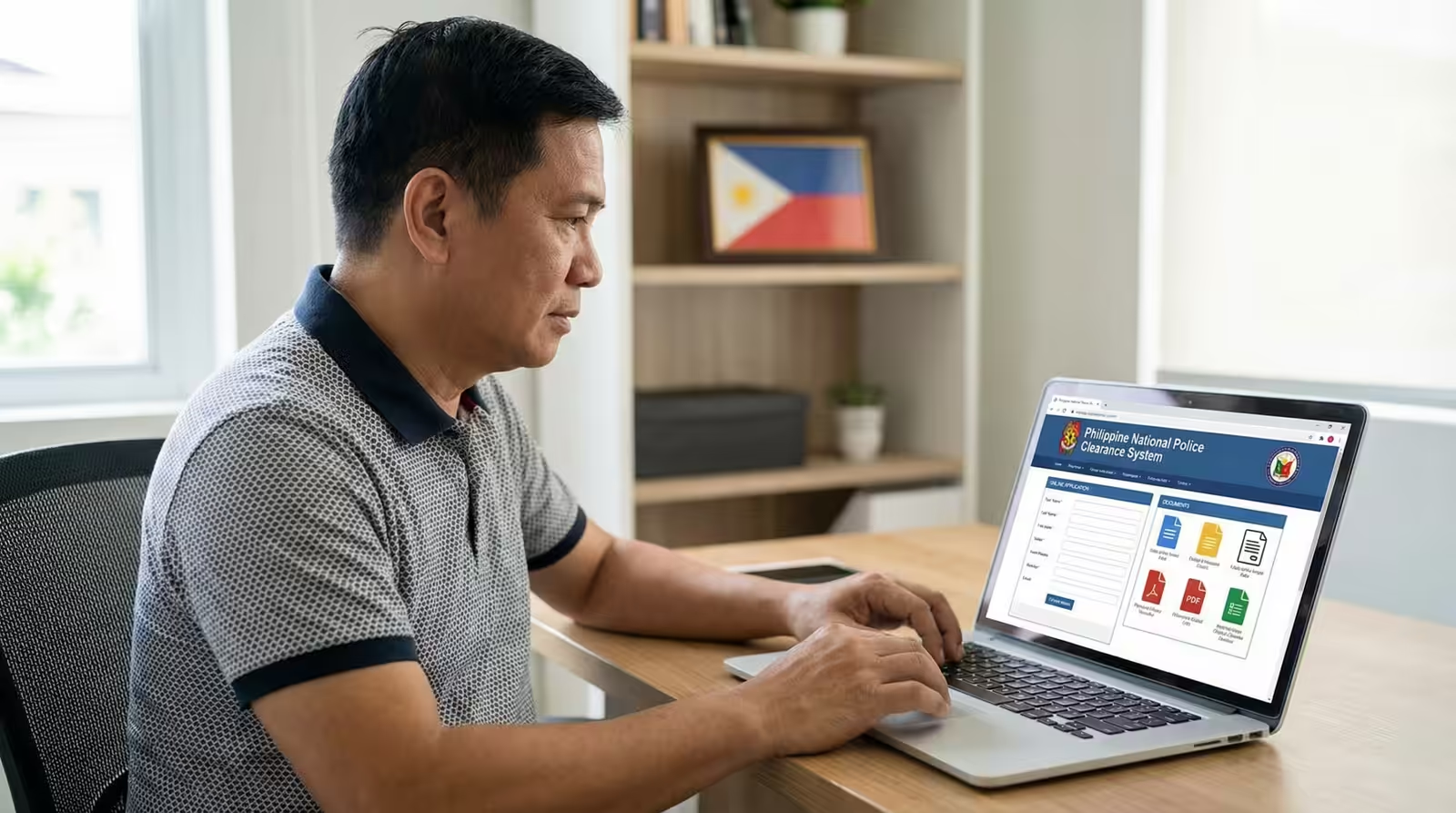
NPCS Clearance Certification: Applying for a National police clearance in the Philippines no longer always requires a visit to a police station. The Philippine National Police (PNP) now allows certain applicants to apply for National Police Clearance online through the NPCS portal. This guide explains who is eligible, what documents are required, and how to complete the process step by step without leaving your home.
Is It Possible to Get National Police Clearance Without Visiting a Police Station?
YES! it is possible to get police clearance without visiting police station. It is called National Police Clearance Certification that is issued by National Police Commission to special category of applicants only.
Who Is Eligible to Get National Police Clearance Without Visiting a Police Station?
There are four specific categories of people who can get national police clearance without visiting police station. The Philippine National Police understand the condition of such people and therefore they allow them to apply for police clearance without appearance at any police station.
Here I provide those four categories of people as under:
- Filipino Citizen Working or Based/Residing in Other Country
- Bedridden Person
- Petitioner [Apply for Probation or Bail]
- Deceased Person [Representative Apply for Clearance]
If you belong to one of the four categories mentioned above, you don’t need to visit any police station to get a police clearance. You can apply for national police clearance online at NPCS website from your home/office without any hassle.
Documents Required for Police Clearance without Visiting Police Station
To apply for national police clearance, you must have all required documents. You will have to upload required documents during online clearance application process.
The required documents are different for different categories of applicants. Here I provide the list of documents needed by each category person to apply for police clearance online without visiting police station.
Filipino Citizen Working or Based/Residing in Other Country
- Applicant’s Selfie holding Valid Government ID
- Bio Page of Passport with Name and Expiration Date
- Pages of Passport with Entry/Exit Stamp of the Bureau of Immigration
- Applicant’s Company ID or Resident ID or Copy of Visa or Any Valid Document to prove that Applicant is Outside Philippines.
- A Valid ID that contains Applicant’s Philippine Address
- A 2×2 Photo with White Background
Bedridden Person
- Applicant’s Selfie/Photo holding Valid Government ID or Current Date Newspaper
- Medical Certificate from Attending Physician or Barangay Health Certificate
- A Valid ID or Barangay Residency Certificate
- A 2×2 Photo with White Background
Petitioner [Apply for Probation or Bail]
- Applicant’s Selfie/Photo holding Valid Government ID or Current Date Newspaper
- Certificate Under Custody
- A Valid ID or Barangay Residency Certificate
- A 2×2 Photo with White Background
Deceased Person [Representative Apply for Clearance]
- A Valid ID of Deceased Person
- Death Certificate of the Deceased
- Selfie of Representative
- Proof of Relationship between Deceased and Representative
- A 2×2 Photo with White Background
How to Apply for National Police Clearance without Visiting Police Station
To apply for national police clearance without visiting police station, you should learn the online process and follow it step-by-step as I explain it here.
#1. Online Registration at NPCS Portal:
The NPCS online registration is mandatory for all first time applicants. If you have a registered account at NPCS portal then you don’t need to register, you can move to the next step. In case you did not sign up at NPCS portal in the past, you must do it now.
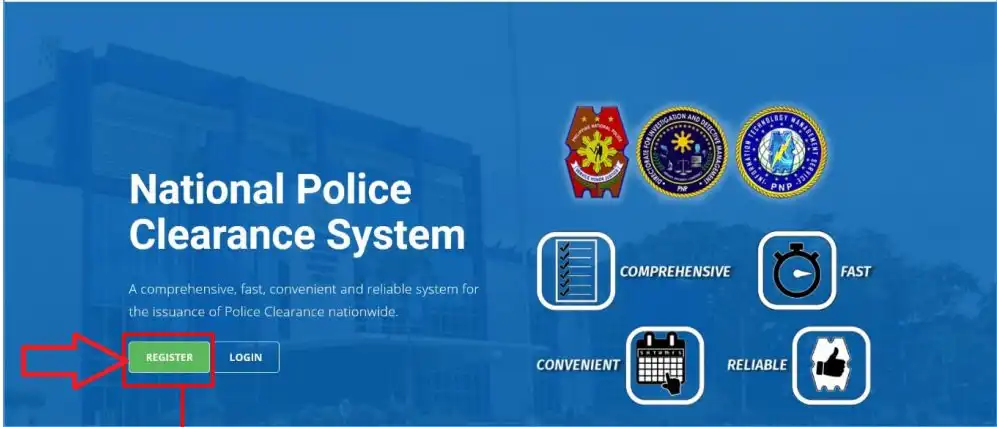
You must have a registered account at NPCS portal to apply for national police clearance online in the Philippines. If you don’t have it, kindly follow the steps given here to do online registration.
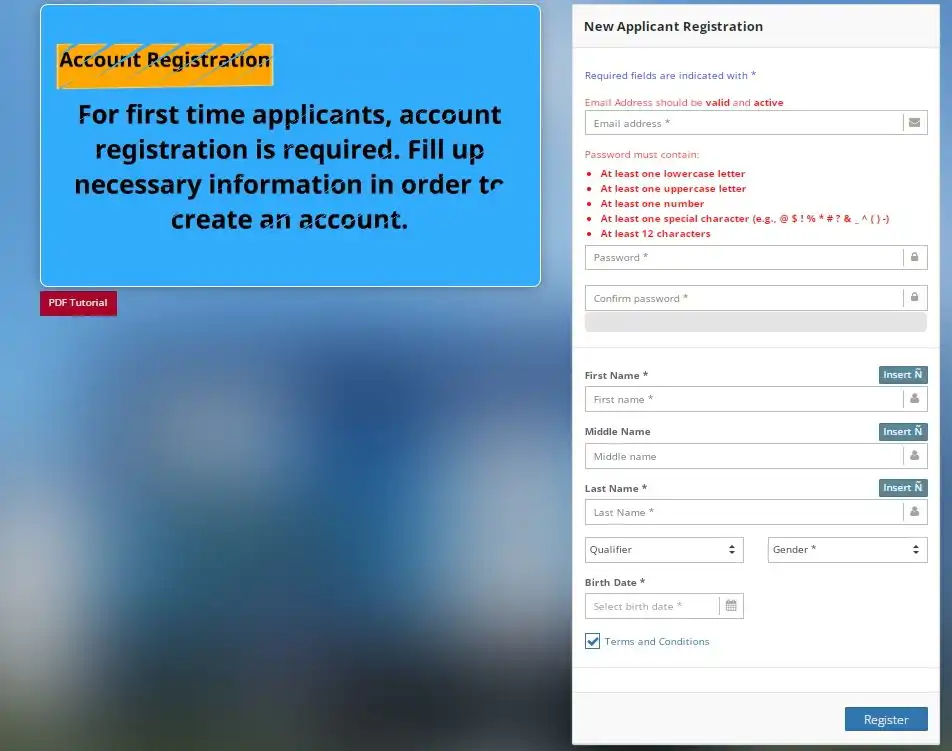
- Go to NPCS website at pnpclearance.ph.
- Click on Register to start.
- Click on Begin and complete human verification.
- Tick the boxes to Accept NPCS Terms & Conditions.
- Register yourself with Email, New Password, First Name, Middle Name, Last Name, Qualifier, Gender and Birth Date.
- Click on Register button to proceed.
- Check new email received from NPCS, click on verification link to validate/activate your account.
#2. Sign-in and Complete Profile:
After completing online registration, you can sign-in to NPCS website and complete your profile.
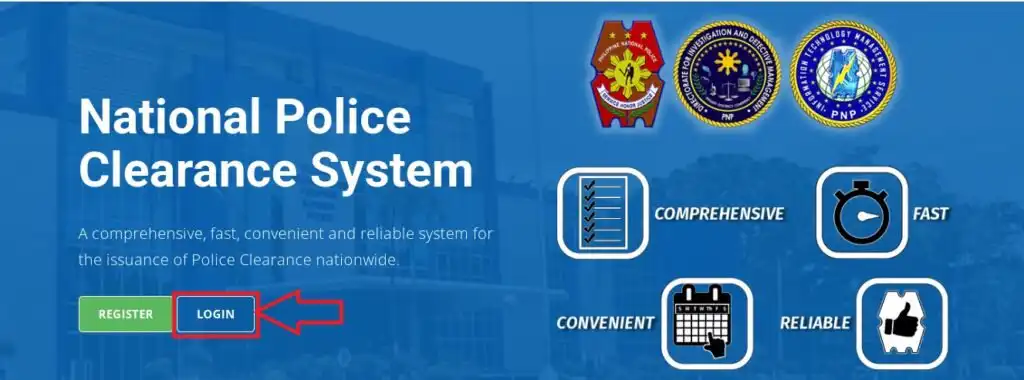
- Go to NPCS portal pnpclearane.ph and click on Login.
- Click on Begin and go through human verification.
- Enter your Email and Password, then click on Sign-in.
- Click on Edit Profile and fill up the form with your personal information.
- Provide your Civil Status, Nationality, Birth Place, Birth Certificate Registration Number, Mobile Number and Residential Address.
- Also provide your Height, Weight, Complexion, Identifying Marks, Blood Group, Religion, Occupation and Educational Attainment.
- Provide your Family Background including your father’s information, mother’s information and spouse’s information.
- Click on Save Profile to finish editing and updating info.
#3. Click on Clearance Certification:
After editing/updating profile, get back to dashboard and click on Clearance Certification button to apply for clearance.
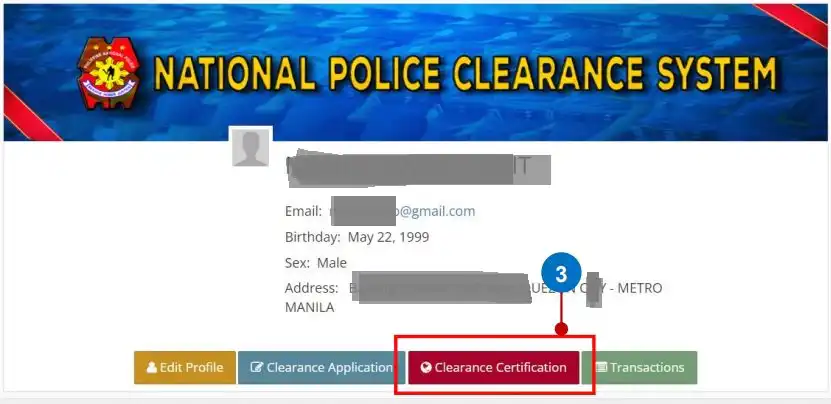
#4. Select Your Category:
The national police clearance certification application allows the applicant to get their clearance without visiting police station. This facility is available for four categories given below, you need to select your category to continue to the next step.
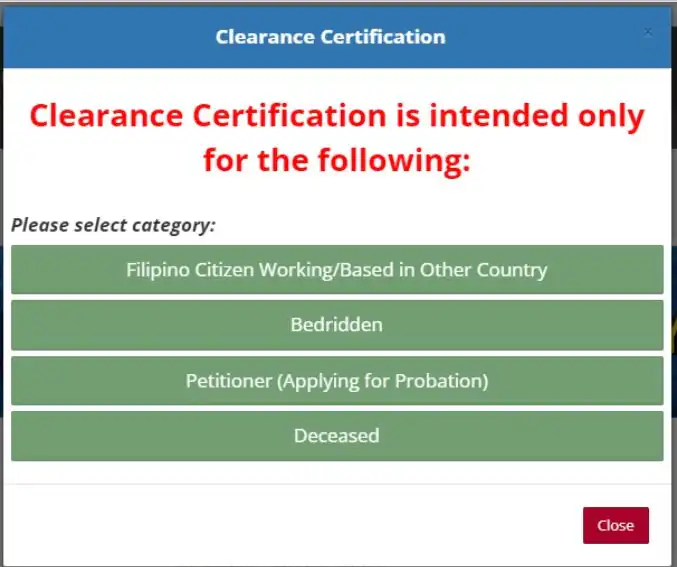
- Filipino Citizen Working/Based in Other Country
- Bedridden
- Petitioner (Applying for Probation/Bail)
- Deceased
#5. Read Requirements and Click on Apply:
As you select your category, a new page will show up. Here you can read the requirements for police clearance online application for your category. Read carefully and then click on Apply for proceed.
#6. Select Clearance Purpose and Current Address:
You need to provide your clearance purpose and your current address. Please provide full address with correct spelling and then click on Next to proceed.
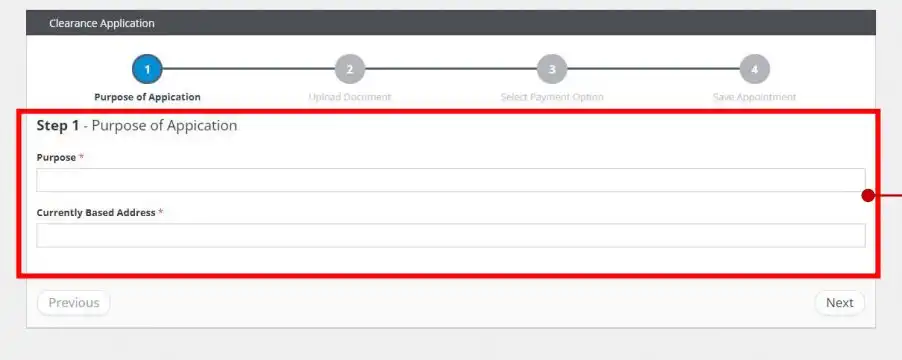
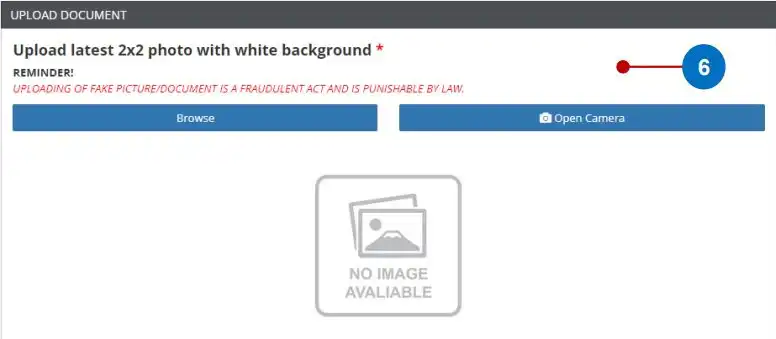
#7. Upload a 2×2 Photo with White Background:
Kindly upload your recent photo in two-by-two (2×2) size. Make sure that the photo has white background. Just click on Browse, find your 2×2 photo from gallery/photos storage and select it to upload.
#8. Upload a Selfie Holding Valid Government ID:
After uploading photo, now you need to upload your selfie while you are holding a valid Government Issued ID in your hand. Make sure that the selfie is captured in daylight and the ID is clearly visible in the selfie photo.
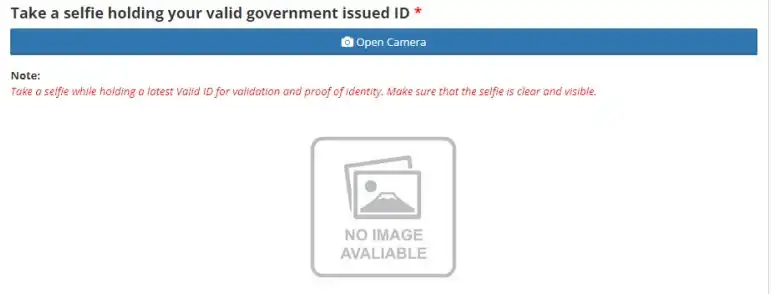
Click on Open Camera and take a live selfie holding a valid Government ID, then confirm to upload it.
#9. Upload Required Documents PDF:
Based on your category, you need to upload required documents one-by-one. Please upload all required documents in high quality PDF, the maximum file size allowed is 2 MB.
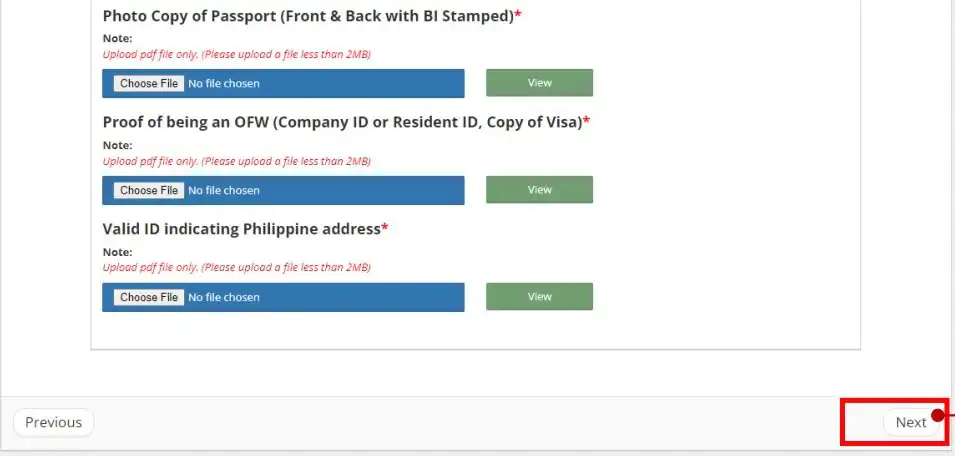
You need to upload your passport, barangay residency certificate, medical certificate, death certificate, proof of relationship and other documents depending upon your selected category of applicant. After uploading all documents, click on Next.
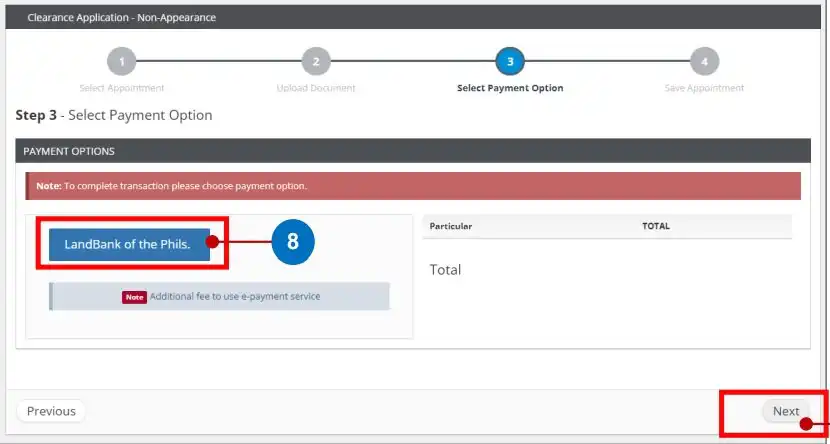
#10. Select LandBank of Phils as payment option:
After uploading documents, you should select the payment option. Click on LandBank of Phils option and then click on Next.
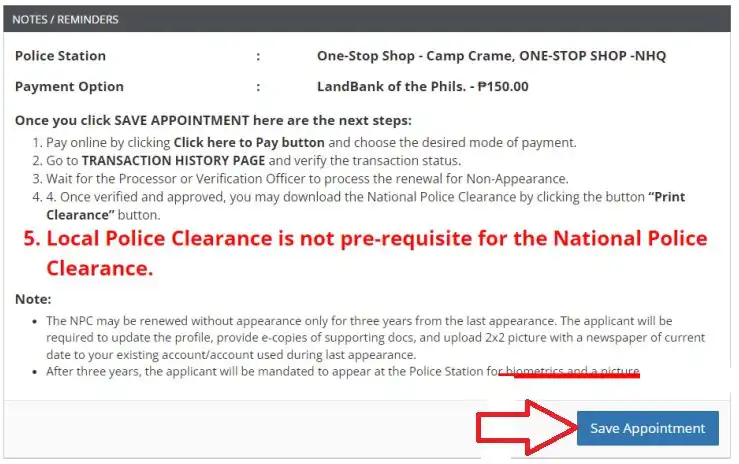
#11. Save Appointment:
Read the instructions given on Notes/Reminders page and click on Save Appointment to continue.
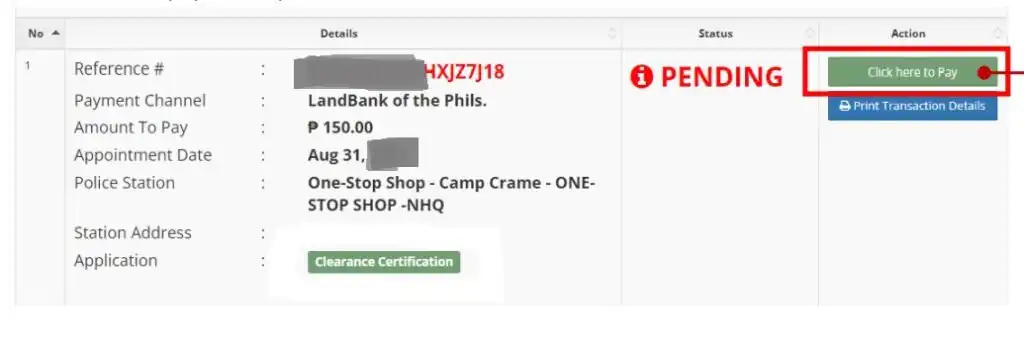
#12. Select Transactions and Pay Clearance Fee Online:
Select Transactions option and find out the latest clearance application at the top. Then select Click here to Pay option and make payment of clearance fee.
#13. Wait for the Clearance to be Processed:
After the payment is done, you should wait for the transaction status to change from pending to paid/successful. You can check the Transactions section to know if the payment is successful and if the clearance is processed/released or not.
Depending on the workload, the verification officer may take a few minutes to hours to process your police clearance application and release your police clearance certificate.
#14. Download Police Clearance Certificate PDF:
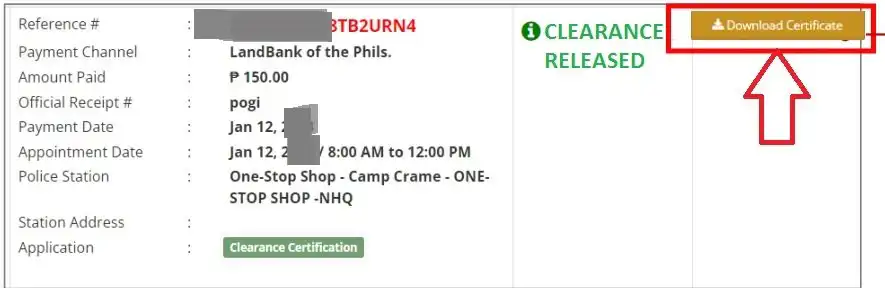
Once your police clearance is released, you can download it as PDF from the NPCS portal. Kindly follow the steps given here to download police clearance certificate PDF on your mobile phone or computer.

- Go to NPCS website at pnpclearance.ph.
- Login with your Email and Password.
- Select Transactions section.
- Check the last transaction given on top.
- If the status shows Clearance Released then it is available to download.
- Click on Download Certificate to save your clearance as PDF file.
- Download and Print your police clearance certificate.
In this way, you can apply for national police clearance online without visit police station and download your clearance certificate as PDF using the NPCS web portal.
Is Clearance Certification Same as Standard Police Clearance?
No, the police clearance certification is not the same as standard police clearance. Because the police clearance certificate is released online without capturing applicant’s fingerprints and requiring their physical visit at the police station.
On the other hand, the standard police clearance is released by the police personnel at the designated police station after completion of applicant’s live photo, signature, biometrics registration and original documents verification.
Can I Apply for Standard Police Clearance without Visiting Police Station?
No, you cannot apply for standard police clearance without visiting police station. Though you can apply online at NPCS portal to register, apply for clearance, set appointment and pay clearance fee but you have to visit the police station to register your biometrics, photo and signature, then get your documents verified and collect your police clearance at the end.
Can I Renew Standard Police Clearance without Visiting Police Station?
Yes, you can renew standard police clearance online without visiting police station. The Philippine National Police allow this facility to registered applicants whose clearance is about expire. Such applicants can apply for national police clearance renewal online without visiting police station for up to 3 years from last visit to the police station for clearance appointment purposes.
After 3 years, the applicant must visit the police station to register biometrics (photo, signature and fingerprints) and submit original documents for verification by police personnel. Only then the police will release the standard police clearance to the applicant.
Is Clearance Certification Valid for Employment?
Yes, the clearance certification is valid for employment but it may not work as a valid document where the applicant’s biometrics data are required to be added to the clearance.
If you need a police clearance with biometrics data then you must apply for standard police clearance online and also visit the police station to complete your clearance appointment and collect your clearance.
Final Thoughts on Applying for National Police Clearance Without Visiting a Police Station
Philippine National Police provide police clearance certificate on request basis to everyone living in Philippines and Filipino Citizens living in or outside Philippines. The police station visit is required for standard police clearance, while it is not needed for clearance certification for specific categories.
I have explained the complete process for how to apply for national police clearance without visiting police station for Filipino Citizens working/living abroad, bedridden, petitioner and deceased applicants. In case you still have a query, ask it in comment section without any hesitation.
FAQs
Can I apply for national police clearance online?
Yes, you can apply for national police clearance online at NPCS portal.
Can I get national police clearance without visiting police station?
Yes, you can get national police clearance without visiting police station if you are a Filipino Citizen working/residing abroad or bedridden or deceased or petitioner applying for probation/bail.
How does clearance certification different from standard clearance?
The clearance certification is issued online by NPCS verification officer without the need of applicant’s visit to the police station. On the other hand, the standard police clearance is issued by police personnel at the police station and it compulsorily requires applicant’s visit at the police station for biometrics, photo and document verification.
How long is police clearance certification validity?
The police clearance certification validity is six months from the clearance release/issue date.
Can I pay my police clearance fee online?
Yes, you can pay your police clearance fee online during online application process.
Can I get the police clearance delivered at my home?
No, the Philippine National Police does not provide clearance delivery service, therefore you cannot get the police clearance delivered at your home.
Can I download my police clearance?
Yes, you can download your police clearance certificate as PDF from NPCS portal after a few hours of completing online application and fee payment.