PNP Police Clearance Renewal Online without Appearance

National Police Clearance is an essential document for all Filipino citizens and expatriate workers living in the Philippines. The PNP police clearance comes with a certain validity; when its validity is over, the applicant must apply for renewal.
The Philippine National Police (PNP) allow the applicant to apply for police clearance renewal online via the NPCS website. All registered applicants can renew their police clearance online and pay the renewal fee online at NPCS website (pnpclearance.ph).
There are two ways to renew police clearance online.
- Police Clearance Renewal Online without Appearance
- Police Clearance Renewal Online with Appearance
The police clearance renewal online without appearance allows the applicant to renew their police clearance online without visiting a police station. On the other hand, the police clearance renewal online with appearance requires the applicant to apply for renewal online, set an appointment, and then visit a police station to complete the process and claim their police clearance.
Here I provide the difference between police clearance renewal online without appearance and with appearance as follows.
| Subject | Online Renewal (Without Appearance) | Online Renewal (With Appearance) |
| Eligibility Criteria | Available only if your previous National Police Clearance was issued within the last 3 years and you meet the system’s eligibility requirements for non-appearance renewal. | Required if your previous National Police Clearance was issued longer than 3 years ago, or if the system determines that you are not eligible for non-appearance renewal. |
| Personal Appearance | Not required. Identity is verified using your existing records in the PNP system. | Required. You must visit your selected police station for identity verification and/or biometric capture. |
| Application Process | Submit the renewal application and pay the fee online at NPCS website. No need to visit any police station. | Submit the renewal application and pay the fee online, then attend your scheduled appointment at the chosen police station. |
| Ideal Method for | Best for applicants with a recent (within 3 years) clearance, unchanged personal information and existing biometrics on file. | Necessary for applicants with a clearance older than 3 years, updated personal information, missing or outdated biometrics, or when the online system requires in-person verification. |
National Police Clearance Validity
Generally, the National Police Clearance comes with a validity of six months from its issue date. After six months, the PNP clearance becomes invalid, and it cannot be used as a document for job applications or any other purposes.
The National Police Clearance validity or expiration date is clearly mentioned on the police clearance itself. If you want to check your police clearance validity/expiry, just take a look on your police clearance to find out its exact expiration date.
When to Renew My Police Clearance
You can renew your police clearance before its expiry date, on the expiry date (last date) and after its expiry date. The Philippine National Police allow you to apply for PNP police clearance renewal online before your current clearance expires so that you can have a new police clearance even before your current clearance validity gets over.
It is completely up to you when you want to renew your police clearance. The PNP Authority accepts police clearance renewal online application at National Police Clearance System (NPCS) website. You can apply for PNP Clearance Renewal Online before or after your current police clearance expires.
National Police Clearance Renewal Fee and Payment Methods
As per the information provided on the National Police Clearance System, the National Police Clearance Renewal Fee is PHP 150. The Philippine National Police takes PHP 150 as a fee for fresh applications and for renewal applications of a national police clearance.
Kindly note that the total payable fee amount may be higher than PHP 150 because the payment channels/partners charge service fee or convenience fee which must be bear by the applicant as per rules.
How to Pay the National Police Clearance Renewal Fee
The police clearance renewal fee can be paid using various online payment methods and also via over-the-counter cash payment. Here I provide the list of payment methods accepted for PNP clearance renewal fee payment as follows.
| Payment Method | Description |
| GCash or S-Pay (ShopeePay) | Pay conveniently through the GCash app or ShopeePay app using the payment reference number. |
| Maya (PayMaya) or Grab Pay | Complete your payment through the Maya e-wallet or Grab Pay. |
| BancNet / Online Banking | Pay using participating banks through BancNet or supported online banking services. |
| Land Bank of the Philippines | Make payment through LandBank’s online payment gateway or at a LandBank branch. |
| 7-Eleven / ECPay | Pay in cash at participating 7-Eleven branches or ECPay partner outlets using your payment reference number. |
Requirements for National Police Clearance Renewal Online without Appearance
To apply for police clearance renewal online without an appearance, you must meet the requirements that I am sharing here.
- Your previous police clearance must be issued within the last 3 years.
- You must update your personal information in the NPCS Account Profile before applying for renewal.
- You must upload your recent 2×2 Photo with a white background.
- You must upload your Selfie holding a valid government-issued ID.
- Your 2 x 2 photo and selfie must be clear; blurry photos will be rejected.
How to Apply for Police Clearance Renewal Online without Appearance
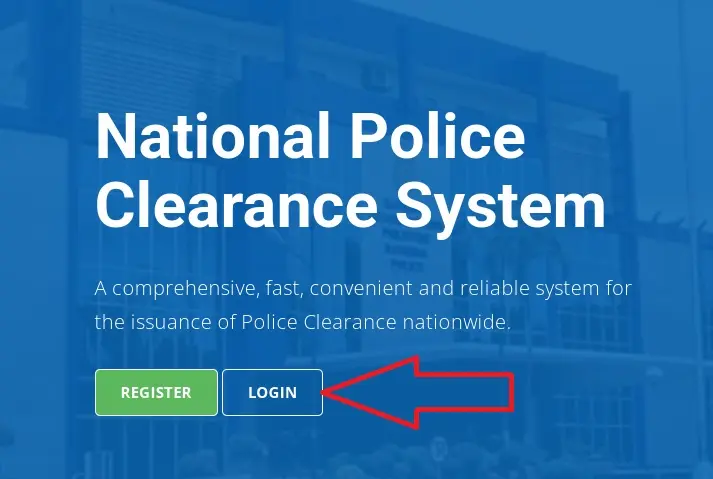
#Step 1: Go to NPCS Website and Click on Login
Go to the official NPCS website at pnpclearance.ph. Then click on Login button.
#Step 2: Pass Human Verification to Go to Login Page
Click on Begin to start human verification. Select relevant images and click on Confirm to pass human verification and go to NPCS Login Page.
#Step 3: Login with Your Email and Password
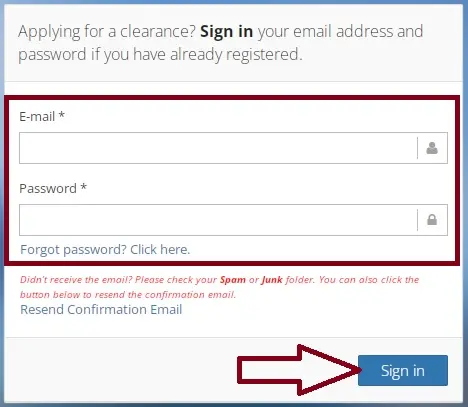
Provide your Registered Email and Password, then click on Sign In button to proceed.
#Step 4: Edit Profile and Update Personal Info
After successful login, click on Edit Profile. Check your personal information and update the details as needed. Make sure that all your information in NPCS Account Profile are accurate and up-to-date. Then click on Save Information (or Save Profile) to continue.
#Step 5: Apply for Clearance and Choose Renewal Non-Appearance
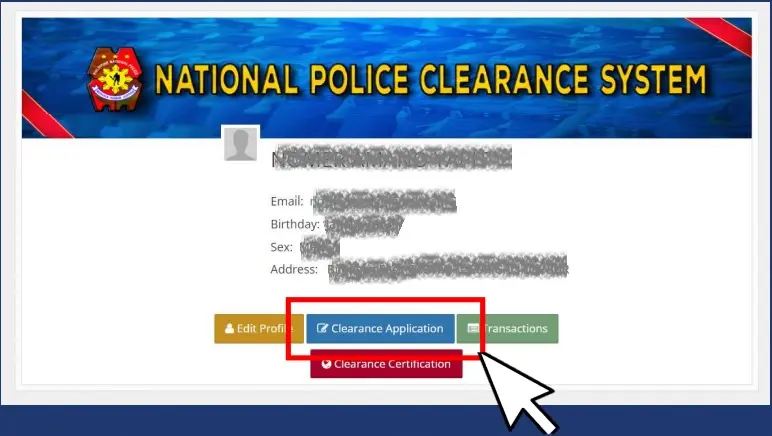
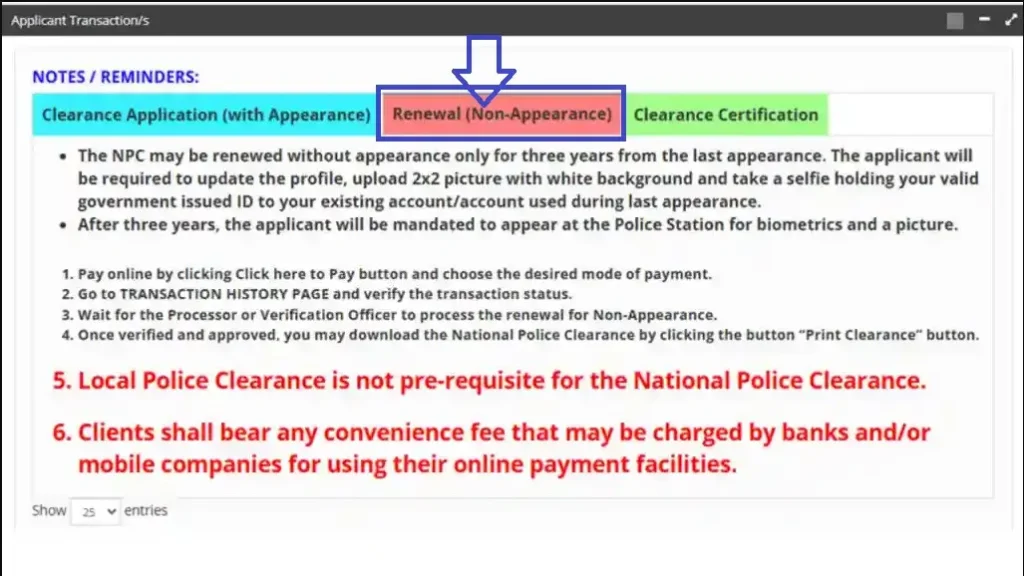
After updating personal details in your profile, click on Clearance Application button. Then click on “Renewal Non-Appearance” option to choose the police clearance renewal online without visiting police station.
#Step 6: Upload 2×2 Photo with White Background
Now upload your recent 2×2 photo with white background. Make sure that the photo is clicked in a well-lit area, the background is white and your face is clearly visible in it.
#Step 7: Upload Selfie Photo Holding a Valid Government ID
Please upload your Selfie Photo in which you are holding a Valid Government Issued ID in your hand. Make sure that you are holding an Original ID and the Selfie is clicked in a well-lit area. In the Selfie, your face and the Government ID must be clearly visible.
#Step 8: Pay the Renewal Fee Online and Print Receipt
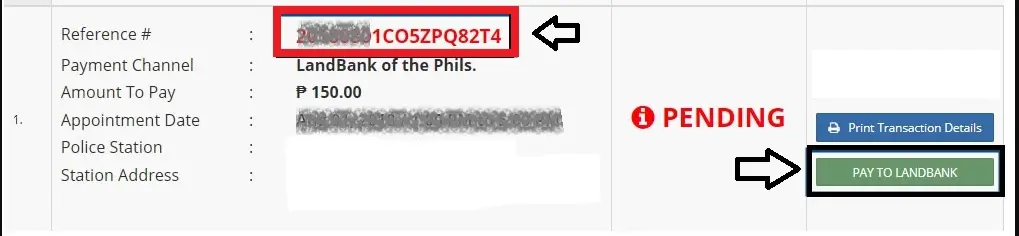
You should click on LandBank or Pay to LandBank option. Select your desired payment method and payment channel, then pay your police clearance renewal fee online (PHP 150 + Convenience/Service Fee). Thereafter print the payment receipt and save it as a proof of fee payment.
#Step 9: Wait for Processing and Download Police Clearance
Your application is submitted as you complete the fee payment and it is successful. Thereafter you should wait for at least 3 business/working days to get your police clearance application reviewed and processed by the processor or verification officer.
How to Download Police Clearance after Online Renewal without Appearance
After you complete police clearance renewal online application, it may take 3 to 5 working days. The processor or verification officer will review your application, check your photo and verify your selfie holding a Government ID. Thereafter the officer will approve your request and release the police clearance.
Once your police clearance is approved and released, the “Download Clearance” button will appear on your NPCS Account. Kindly follow the steps given here to download your police clearance after online renewal.
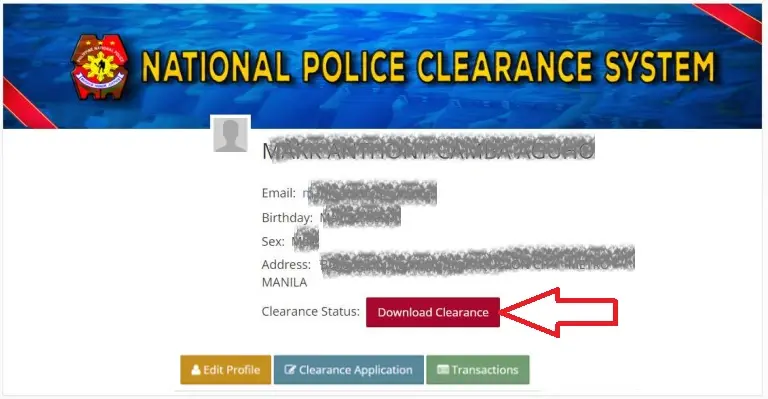
- Go to NPCS Website and Login with your Email and Password.
- After login, click on Transactions option.
- Find out and click on “Download Clearance” or “Download Certificate” button.
- Take print of your Police Clearance.
- You can use the Digital Police Clearance or Its Print as a valid document employment, visa application and other purposes.
So, this is how you can renew your police clearance online without visiting police station and download it from NPCS website.
Requirements for National Police Clearance Renewal Online with Appearance
If your previous clearance was issued longer than 3 years ago then you cannot renew your police clearance without appearance. It is possible that your previous police clearance was issued within last 3 years still you don’t see “Renewal (Non-Appearance) option on your NPCS Account.
If you are not eligible for National Police Clearance Renewal Online without Appearance then you can renew it with appearance. You can apply for renewal online at NPCS website but you have to visit a police station to complete the process and claim your police clearance.
Here I provide requirements for PNP national police clearance renewal online with appearance as under.
Renewal Online Application
- You must update your personal information in the NPCS Account Profile before applying for renewal.
- You must Set Appointment to your desired police station and visit it on your appointment day for verification of document and biometrics capture process.
Appointment: Police Station Visit
You must carry the following documents when you visit your selected police station to attend your police clearance renewal appointment.
- Two Valid Government Issued IDs, make sure that your IDs are not expired, Original, contain your Full Name, Clear Photo and Signature.
- Your Reference Number
- Fee Payment Receipt
How to Apply for Police Clearance Renewal Online with Appearance
#Step 1: Go to NPCS Website and Click on Login
Go to NPCS website at pnpclearance.ph. Then click on Login button.
#Step 2: Pass Human Verification to Go to the Login Page
Now, click on Begin to start human verification, select the concerned images and click on Confirm to pass human verification and go to login page.
#Step 3: Login with Your Email and Password
Provide your Registered Email and Password, then click on Sign In button.
#Step 4: Edit Profile to Update Your Personal Info
After login, click on Edit Profile and check your personal information. If needed, update your personal details and make sure all the details are accurate. Then click on Save Profile to save the updated details.
#Step 5: Apply for Clearance and Select Clearance Application with Appearance
Now click on Clearance Application button and select “Clearance Application with Appearance“ option.
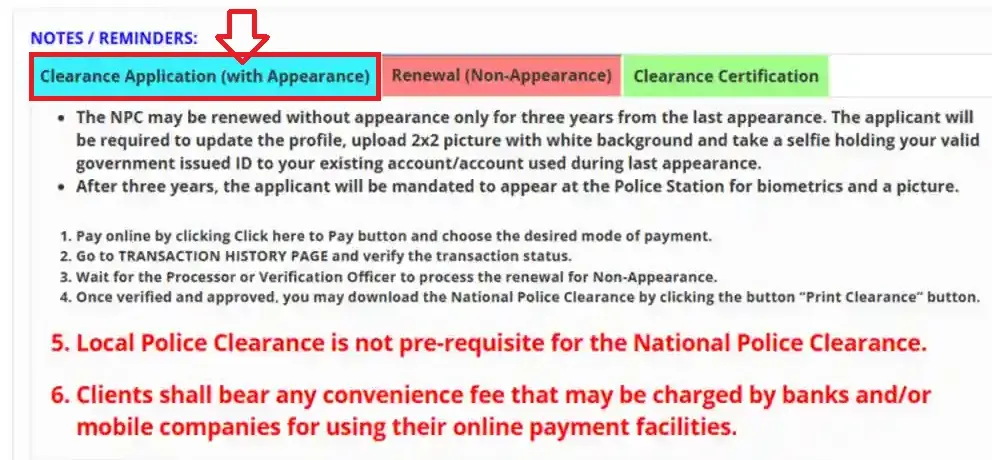
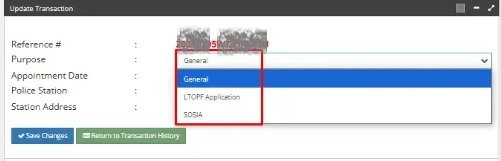
#Step 6: Select Clearance Purpose and Police Station for Appointment
Select “General” in Clearance Purpose and choose your desired police station for your appointment for police clearance renewal.
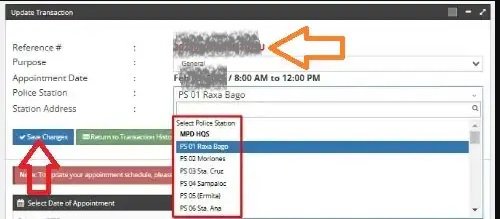
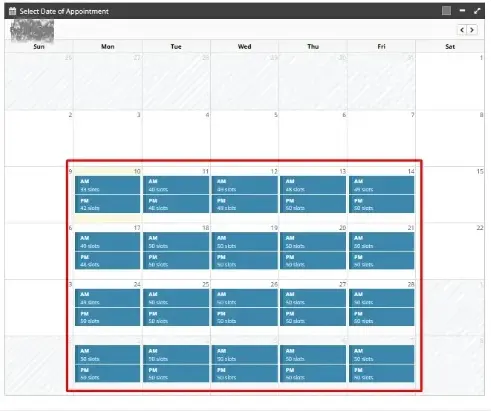
#Step 7: Set Appointment Date and Time Slot
Now you need to set the appointment date and time. Select the date on which you can visit the police station to complete the process. You should choose the appointment date and time slot carefully. Then click on Save Changes button.
#Step 8: Pay the Renewal Fee and Print Payment Receipt
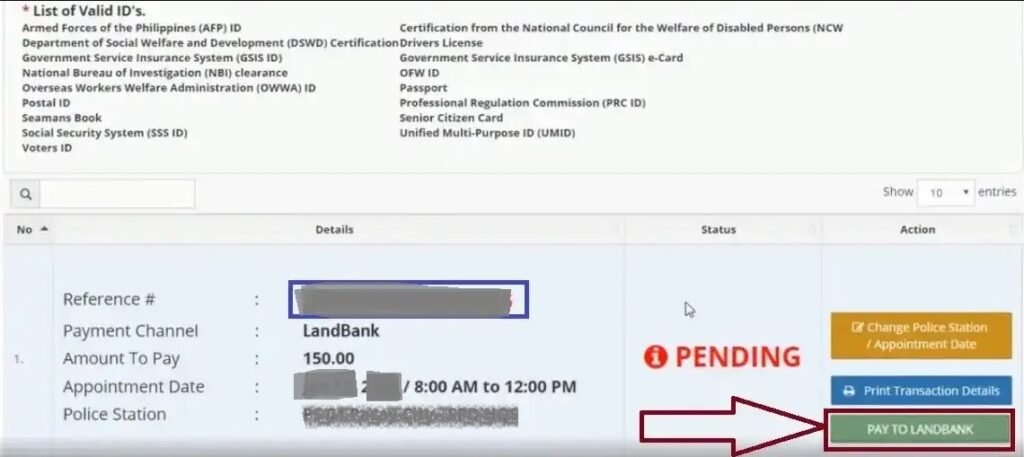
You need to pay the police clearance renewal fee online. Select “Pay to LandBank” button. Choose your convenient payment option and pay the renewal fee online. Then print the payment receipt and note down your Reference Number as it is required for the appointment day.
Visit Police Station to Complete Process and Claim Police Clearance
After completing fee payment, you need to wait for your chosen appointment date. Then follow the steps given here to complete your police clearance renewal appointment at your selected police station and claim your national police clearance.
- Visit your selected police station on your appointment day. Reach 10 minutes before your appointment time.
- Provide your Reference Number, Fee Payment Receipt and Two Valid Government IDs to the service personnel.
- Wait for your documents to be checked and verified. Then move towards biometrics section.
- Register your fingerprints, signature and get your live photo captured.
- Wait for the processing, the service personnel will try to find your records in the PNP Crime Database.
- Your name will be called loudly when your police clearance is ready, go to relevant desk/window and collect it.
- Make sure that all your details are correct on your police clearance.
Note: Don’t forget to collect your Original Government IDs before you exit the police station after completing the appointment.
Conclusion:
The National Police Clearance is an important document required for job applications, visa, foreign travel, scholarship, business permit and other purposes. But your police clearance must be valid and not expired otherwise it won’t be accepted.
Above I have explained requirements for national police clearance renewal online without appearance and with appearance. I have shared all important information about police clearance renewal online process to help you renew your police clearance easily.
In case you still have a query or question about police clearance renewal, you can ask it in the comment section.